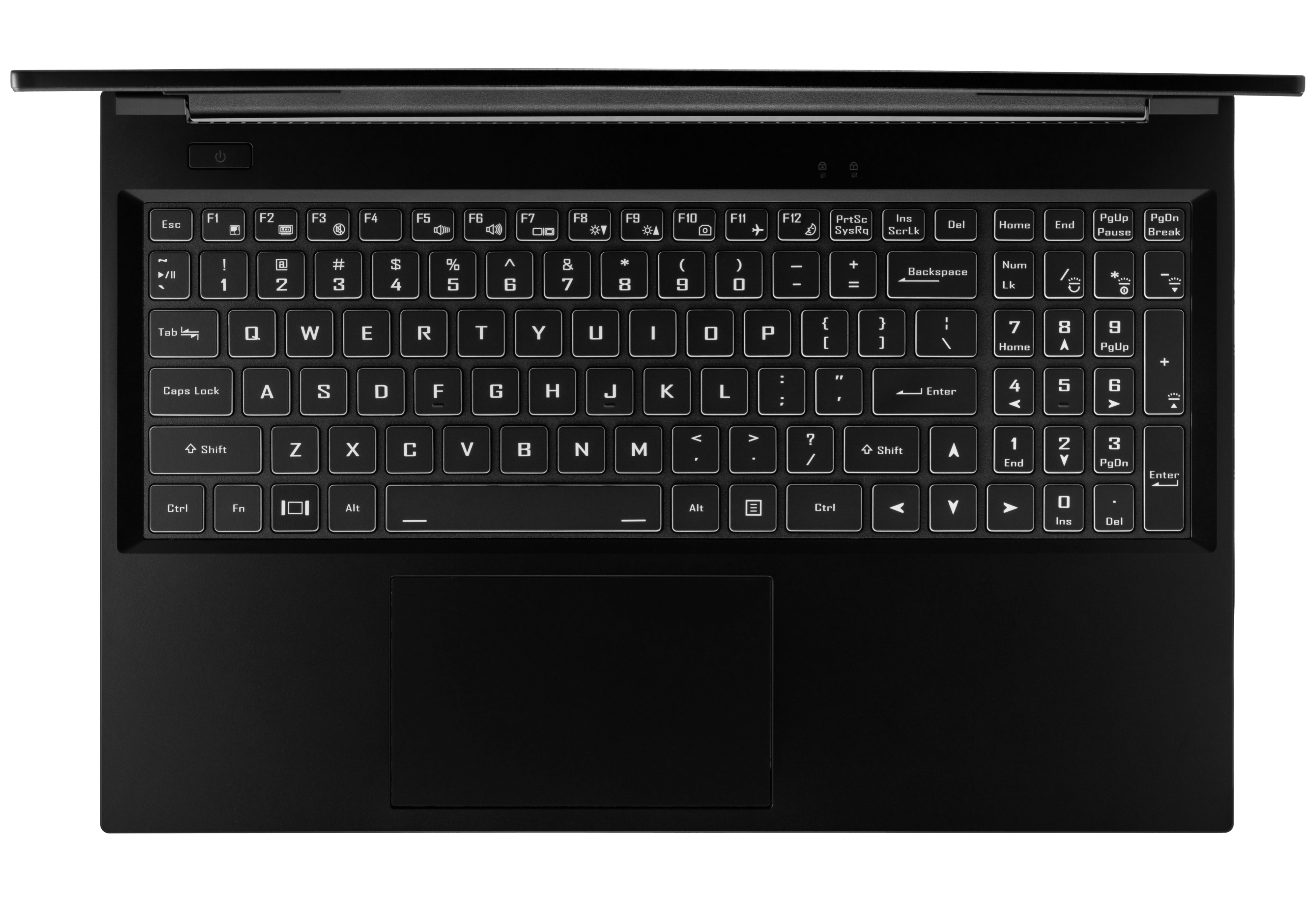
I wish a person could order one of these without the numeric keypad. I deeply hate being off-center to the screen when typing on these larger portables.
I have no idea who thought this was a good idea. The trackpad is even off to the left to accommodate it.
I'm not a fan of symmetry for symmetry's sake, but I do think some affordances for the human body might be a good idea. How do southpaws enjoy this keyboard setup?
The ergonomics of laptops are bad enough without stuff like this.
Southpaw here! I'd never buy a laptop without a number pad. The track pad being off-center is also good.
Gaming? 78462 make for the best movement, and the number pad also has seven non-numerical buttons to bind things to. It also puts your index finger right next to lENTER, which is so useful for games that make use of it.
Programming? Bind the buttons to commonly-used UNIX programs to make for a better IDE than an IDE.
Calculating? So nice to have an ergonomic numerical input.
Why skip 5 to use 2 instead? And you also have extra keys around WASD to bind to. What makes numpad keys any different?
For lefties who use mouse with left hand you can have same keys on the right hand side but hat varies (for me equal keys would be plöä)
>programming
Are all of your function keys already populated? And if you are going to move your hand to numpad why skip over insert, home, page up/down, and end?
>calculating
Well there you have me. 20 years ago when I was manually inserting PSU serial numbers into excel numpad was real nice, but I can't remember last time I had to input numbers like that.
My current keyboard has numpad, but only thing I've used it in years was as abort button for some bots.
Walking backwards usually is slower in video games, so you can bind 5 to something you use more commonly. 7 is autorun. 5 makes a great button to set for fishing or your most-critical spell.
> And you also have extra keys around WASD to bind to. What makes numpad keys any different? For lefties who use mouse with left hand you can have same keys on the right hand side but hat varies (for me equal keys would be plöä)
The left side of the keyboard has more buttons, and you use those for complex combinations in video games, which leaves the number pad in a unique spot of being a "quick access" bar.
> Are all of your function keys already populated? And if you are going to move your hand to numpad why skip over insert, home, page up/down, and end?
On a good laptop keyboard, insert, home, end, pgup and pgdn are all directly above the number pad. This gives you extra buttons that are just a little out-of-the-way, but it doesn't make it so you have to reach your hands over them to reach the number pad. On the best laptop keyboard I've ever used, literally every button was just in a grid, with a few smaller (but still grid-fitting) buttons mixed in, like the arrow keys and function keys.
But yes, my function keys are already populated.
> Well there you have me. 20 years ago when I was manually inserting PSU serial numbers into excel numpad was real nice, but I can't remember last time I had to input numbers like that.
Anecdotally, I use calculators of various sorts as a way of verification while programming; a lot of the problems I find myself drawn to are close to abstracted math (as are most things when you aren't a web programmer), and it's really useful to be able to jot down an equation and verify you've handled the problem right before you commit to it.
> My current keyboard has numpad, but only thing I've used it in years was as abort button for some bots.
You should bind the buttons to be useful to you! It's very nice once you've done so.
Yup, I did this and it's great. I also ended up assigning the thumb key to 0, since I've noticed it's used more often than other digits (and also you have to fit it somewhere, since the other ones are in a 3x3 grid).
Yeah, that was the last time I used a keypad. I really hate mine. I don't have a use case for it and because of it I have to slide the laptop to the right, to align the keyboard with my vertical axis of symmetry.
I understand that many people need it and many others don't. I wish manufacturers had an option for keyboards without the number pad. I'd pay an extra for it.
My favorite (and the one I find myself getting the most joy from using) is /, which I have bound to tangle and weave my currently-open project (dbus, yay) into /tmp, apply a stylesheet to the output of it, determine languages used within, embed Emscripten-compiled interpreters for the languages being used into the generated pages (its file system API is incredible, "I Can't Believe It's Not UNIX!"-worthy), and launch a Mozilla instance so I can interactively play with/debug my programs while reading their documentation in the same window.
If this sounds like a convoluted REPL with fancier in-line documentation, you're kind of right. It's basically just interactive and automated literate programming, though.
The rest of my bindings range from pretty simple (running an open project's tests, displaying results from the last 10 commits, etc.) to significantly more complex. I have a few different xkb layouts depending on what I'm doing, and a few different languages get dedicated ones, but for the ones I most-commonly use, they all share one.
No, the conclusion is that more buttons are always better. You can always customize a keyboard with minimal effort, unless you're on a really bad operating system, like any of the proprietary ones.
> No, the conclusion is that more buttons are always better.
Not really. There was a time where laptops, especially 15", had front speakers. If the choice is that or numpad, I pick front speakers. Its a bummer smartphones don't have them anymore these days. More keys might seem like a no-brainer, but its always also less is more and keys you don't use are useless keys. As power user, it seems (re)binding of keys is in order anyway.
1080p and numpad is a downgrade from my MBP 2015. It also doesn't specify much about the AMD graphics card. I'd rather get a modular laptop instead, but with 1440p minimum.
The thing with a trackpad centered to left (let alone its gonna be as good as a Magic Trackpad 2 by Apple from 2015 and onward), is that if you use your right hand your arm can get hurt if you let it rest. And, you should let your arms rest. Also, the arm is in the way. Apple had a neat solution to it: large(r) trackpad (though I prefer the previous one, centered).
But I was never in the market for this because if I order something like this from USA I get to pay a large amount of taxes on top of it cause the price never includes tax. Let me know if its available in Europe and I'll have a look, but the above remain serious concerns so I doubt it.
The iphone has a front speaker. The top one is a loudspeaker and a normal phone one. And they tune it so when in landscape I don't really notice the difference between the front and outwards speaker.
Phone speakers have come a long way since samsung was putting them on the back of the phones..
I got a 14 inch laptop with front speakers, and a 6 row keyboard. Since I came from a laptop with a 7 row, I actually would prefer to have one of those extra columns of keys that hp makes.
More buttons isn't always better because there's a limited range of motion that is reasonable for someone to type with. Having a number pad on a laptop keyboard reinforces bad ergonomics because you either need to shift your entire body to the left and have your screen off center or you have a constant and pretty severe lateral deviation in your right hand.
As for customizing a keyboard with minimal effort... it's actually easier to do that with MacOS and Windows than it is in linux, in my experience. Sure, you can do basic key remapping really easily in linux with xmodmap but if you want to do anything complicated with the built in keyboard, MacOS has Karabiner Elements which is far better than any of the built in or custom keyboard software like xcape or xkeysnail. Similarly on Windows, AutoHotKey is much easier to do complex customizations as well. I haven't really tried Kmonad but that is cross-platform so it wouldn't really be considered an advantage to linux.
Hard disagree. I dont need more keys, I need better keys. More keys just means more reaching and more strain. I use the Preonic and would love to see layer keys on a laptop instead of a stupidly big spacebar nobody ever uses wasting so much real estate.
I think the Framework laptop is our best shot at it though.
I'd actually be into that. I come from the split keyboards world. Put your god damned numpad in the middle and give me ortholinear keys on each side. I will throw money at you today.
Generally, hobbyist mechanical keyboards that you assemble by buying or fabricating a PCB, and doing a bit of soldering. Most designs have relatively easy soldering.
Some hobbyist shops may offer assembly services. If you don't want to solder, ZSA labs have a "moonlander" keyboard that looks quite nice, for a premium price.
If you're not put off by soldering, then some popular split keyboards would be the Corne (also known as "crkbd"), Kyria, lily58, Sofle.
There are also designs which are closer to a normal keyboard, like the ultimate hacking keyboard. (But, personally, I don't understand why you'd spend so much money on a keyboard and have it be asymmetric).
Split keyboards have been around for quite a while. You can even see the Kinesis Advantage keyboard featured in films like Flubber and Men in Black and plenty of companies have made ergonomic keyboards.
I think there's a sort of hobbyist renaissance going on right now, though. Plenty of new keyboards are being designed and built because it's more accessible than ever to design your own pcb or if not that to get someone else's design printed, which along with the general mechanical keyboard enthusiast market, has given people a wealth of options to choose from.
I love numeric keypads. I don't have to type in big chunks of numbers very often (OCR and GPIB go a long way) but when I do, numeric pads make me hate life a lot less.
I have a custom keyboard I designed, and I configured it so that the tilde key turns the right-hand side into a numpad (ie the yuiohjkl etc keys). It's great, no need for extra unused buttons and very convenient to use (as the left hand is typically not used when typing on the num pad).
I used to have a Sony laptop like this, where NumLock turned the uiojkl keys into 456123, so you could use them (along with 789 above them) as a number pad. It was a clever design and I wish more laptops offered it.
I've never been able to get comparable ergonomics out of these. Maybe I just haven't been forced to use them enough -- or maybe the increased travel distance really does matter. I could see it going either way.
As this thread is highlighting, in my experience there are two kinds of keyboard users. Those that love their numberpad, and those that never use it. There seems to rarely be people in the middle. On desktops it mostly doesn't matter because you can shift the keyboard over relative to the screen. On laptops this translates into people completely loathing or loving the laptop entirely :)
Personally in the never use it camp, and hate these offset laptops. Sometimes its because people do a lot of number data entry spreadsheet style, I can understand that case a little more, however even people that mostly type text I've seen for example will like to enter IP addresses on the number pad for no obvious reason. God speed IPv6 adoption :)
On the other hand laptops are terrible for ergonomics and daily usage anyway, it's unfortunately we've moved so far into laptops from desktops and it doesn't seem so common to dock them and use an external keyboard.. to my feeling mostly because the screen ends up being too small once you push it back to use an external keyboard so then you need an external monitor and the cost and complexity goes up.
> On desktops it mostly doesn't matter because you can shift the keyboard over relative to the screen.
It does matter. The arrow key cluster and numpad take a lot of space, which means the left side of the keyboard (where asdf / your left hand are) and your mouse have to be very far from each other. This leads to either putting the keyboard's letter key section in the center, making your mouse be uncomfortably far to the right, or having your mouse in a natural position for your right hand, leaving your left hand way out to the left. Over time this can (and did, to me) cause posture / muscle balance issues.
Currently I'm using the Microsoft Sculpt Wireless keyboard. https://www.microsoft.com/en-ww/accessories/products/keyboar.... The main keyboard with letters and two extra columns just to the right of the letters (with no gap) means everything can be positioned perfectly. The wireless numpad is there for when you need to use it. It's a very overpriced product at $100 but works wonderfully.
Also, in college I had a tiny desk with a cabinet underneath its left side, so my chair was offset to 60/40% of the way to the right. With a full size desktop keyboard with numpad, there literally wasn't enough space for my mouse, unless I moved the keyboard very far to the left. Thus causing the issues I mentioned above. That's what got me into tiny mechanical keyboards :) I'll admit it's a somewhat niche case, but there are probably still many millions of people in the world with a similar desk setup to that for whom a full size desktop keyboard is an unhealthy option.
You are totally right. I forgot about this. I went from the sculpt wireless to the sculpt ergonomic and the non detachable keypad was really annoying for that exact reason.
I really don't see how it is "too wide for good ergonomics" as you imply if a keyboard has a number pad. I think you exaggerate the amount of difference it makes to try to make a point based on your anecdotal experience which was also based on a poor desk design rather than the KB/mouse layout alone.
> On the other hand laptops are terrible for ergonomics and daily usage anyway, it's unfortunately we've moved so far into laptops from desktops and it doesn't seem so common to dock them and use an external keyboard..
Especially considering that nowadays "docking" is pluggin in an USB-C cable from a monitor that:
- is used as a large external display
- powers and recharges the laptop
- acts as an USB hub, with external keyboard, mouse and webcam.
If I want I can go outside to have a meeting and when I want to code, I go back to my home office. And when I commute to the work office, I can work on the train. And when I get there, I plug it in the same setup as home.
Next step would be having all of this wireless but it's already near perfect IME.
I think a lot of people just haven't learned to touch-type the top number row. It was required for me to graduate to the 6th grade in 2002 to get at least 35 WPM / 90% accuracy on the typing test, and there were a bunch of numbers in there so using the type row naturally was an important part of this. I suspect people who have had similar experiences would never use the numpad. The context switch alone causes huge amounts of downtime.
For me it's the other way. I have no issues embedding nubers in the touch typing when typing normal text, but if there are only numbers, accuracy will go down, unless I bring my center down to the asdf line, which slows me down a lot.
I also did practice my musscle memory for the numpad in a similar way to touch as part of typing scientific data (back in the 90s). After a couple of weeks of that, my speed on the numpad would be at least twice as high as when typing numbers on the main keyboard. Also, accuracy was high enough that I could reliably trust the output even when not looking at the result (very close to 100%), which is critical for many use cases that involve numbers.
Even if I spend 99% of my time on the regular keyboard now, if I have to spend more than 5mins typing only numbers, I will feel really frustrated without a numpad.
Then again, I tend to use the laptop keyboards quite little anyway, mostly only while travelling or when in a meeting room. In the office, there is a dock and at home I use a desktop.
I’d expect that the ergo costs of using a laptop at all (short key travel, screen down from eye level) would swamp the additional cost of having the keyboard off center. After all, you can just crane your neck down and sideways instead of just down :).
Seriously, anyone using a laptop full time for work (who cares about ergo) should invest in an external keyboard and monitor.
> Seriously, anyone using a laptop full time for work (who cares about ergo) should invest in an external keyboard and monitor.
FWIW, I’ve been using a 15” MBP as my primary dev/work machine for over a decade and I’ve just become used to it. Tried external monitor, keyboard a few times, but it just doesn’t work for me anymore. I mostly run in high res mode, as opposed to the scaled default mode and it works well. This is also why the 13” laptops are not an option for me, am eagerly waiting for the 16” MBP fingers crossed.
It sounds like you're advocating for a desktop system. I usually dock my laptop, but I do like the flexibility of detaching and sitting on the couch. When I'm using my laptop, as a laptop, I like to feel comfortable. To me numpads on laptops have negative value.
You and many others probably know this, but figure it's helpful context for others who might stumble through this thread: it's not necessarily all on System76 as to why that shell is used, since the shells themselves are (IIRC) rebranded Clevo shells still.
i.e I would suspect they're making use of what they can reasonably acquire to sell.
Might just be a personal preference, I have two laptops (one of them a system 76) with numpads because I highly prefer having them. Macbook keyboards without them really annoy me. Obviously peoples mileage will vary.
The usual story is that is is about pitchers, but the timeline is wrong. The first official baseball game is cited as in 1846, with "southpaw" occurring in 1848 already referring to boxing.
It's oh so terrible isn't it? I feel like this is one of those flexible majority things that Nassim Taleb talks about [1]. The vast majority of people don't care one way or the other. There is a small minority who wants the numeric keypad and an even smaller minority that despises the numeric keypad and will never buy a laptop that includes one. For me, it's always been yet another selling point for the Macbook.
The trackpad is not centered. I'm the small minority that won't touch a laptop with an off centered trackpad. It's very uncomfortable for me as I use my right hand. Ideally manufacturers should make a large touch screen/surface that covers the entire area below the keyboard. We have the technology, it can be done.
Some programs like blender treat the top row numbers as totally different things (actually numbers vs camera movements) and for people typing a lot of numbers, the num pad is faster apparently.
Useless? Did you never learn how to touch type the numbers? Unless you do data entry the top row numbers are vastly quicker to get to than the number pad. You just reach a finger out and tap instead of moving your whole hand to the number pad.
I am not in a full time development role anymore, but even when I was I never felt the need to drive my WPM numbers to the extreme.. So the fractions of a second it may save was not a consideration.
I find the 10-key to be more accurate and faster for me. My muscle memory is numbers are entered with my right hand...
You interact with a computer only through the screen, speakers, microphone, and keyboard.
So of course, the advertisement for every laptop emphasises internal component metrics that don't actually matter that much. "Now with X8-7820Z SUPER!" or whatever.
Instead they have terrible screens, tinny speakers, noisy microphones, and non-customisable keyboard layouts. The latter of which are always cramped, and I mean always, even on 17" laptops.
Do you have any idea how cheap it would be for these manufacturers to allow you to choose your keyboard layout? It's a removable tray already! They can be swapped out in seconds! There are multiple keyboard layouts available from the parts manufacturers!
I believe the Framework Laptop offers that, though it's very new and the non US keyboard options are available yet. They're aiming for a pretty decent list by end of year including UK, French, Chinese, Korean, German and blank (both ANSI and ISO).
I'm in no way affiliated with Framework either. Just saw it mentioned few times in tech press recently. Finally watched some video reviews today and have to say I'm very impressed. Definitely eyeing them as a replacement when my ThinkPad turns four years old next year.
i deeply hate being without a numpad. I understand it's duplicated space, but typing numbers on a numpad is just a million times faster than going above the alphabet keys.
In my limited beginner experience (rarely use numpads, mostly in Blender, or virtual numpads), it's awkward to turn virtual numpads on and off, I keep forgetting which state the keyboard is in, and it's hard to read the grayed-out key labels to figure out which normal key maps to the numpad key I want.
If you work in a bank, entering deposits and withdrawals all day. Or a shop that doesn't have a barcode reader. Or if you're an accountant. I suppose you could also argue for a special programmer's pad too. I mean, I play the odd FPS and I'm still happy with WASD so I'm definitely not gonna understand.
The "5" key on most numpads has a bump so I can reach it without even looking at a keyboard I'm familiar with. Any 4-digit security pin I use is entered from numpads.
I always buy a laptop with a numpad. Its my preferred method of typing numbers. There are also a whole slew of video game applications, as well as Blender movement (camera angles, camera movement, etc. etc.) that's highly intuitively mapped to the numpad.
------
I should note that when I was practicing for the video-game community "Blazblue", all movements were discussed in terms of numpad. 236 is quarter-circle forward. 69874123 is "360-degree circle, counterclockwise, starting with right".
Needless to say, typing a combo such as 5b 5c 2d 28d 28 b c b 8 b c 236c 2d was much easier with a numpad.
Anyone who wants to "decode" the button pushes only needs to look at their numpad to see how their left-hand should move, with "b, c, d" being the keywords for the right-hand buttons in Blazblue. Street Fighter players use lp, mp, hp (light punch, medium punch, heavy punch) instead. So those bits get game specific, but the numpad approach to discussion is basically considered superior.
The bump on the j-key on the keyboard, and the 5-key on the numpad is very much clear to high-speed typing.
On keyboards without bumps, I find myself off-aligned. Instead of typing "jumping jellyfish", I type "hynoubg hekktfusg", and have to realign my hands.
Could I do it without the bump? Probably. But having the bump there (both the j-bump and the 5 bump) is very useful at preventing this mistake.
I did data entry for a job. In my experience, the numpad was considerably faster and accurate. It has been a long time, but I recall it cutting down entry time by ~5-6x (yes, I finished my daily quota in about an hour or two, instead of all day). The advantage was being able to use multiple fingers comfortably, without looking (there is a nice nub on most numpads) and leaving a hand free for letters/tabs. But like anything, I'm sure there are people that would have a different experience.
You'd be amazed how much cheaper it is to have a human do it than pay for automation. But also, law/contract required the data to be accurate (so there were 3 people, at minimum, entering the exact same data and records would be flagged if any of the 3 did not match). OCR, at the time (and even now), is highly unreliable with human handwriting. Not that I disagree with your statement, automation would have been nice. And though I like to think we want humans doing higher-level things, a lot of the people there were happy to get decent pay and not have to think for their day job.
I haven't had a full keyboard with a numpad in years, but if you ever worked in any data entry job in your career and learned to properly touch type on the numpad it is wildly faster than touch typing with the regular keyboard and needing to use two hands to reach all of the numbers.
I suspect the utility of a numpad is increased while the off center problems are decreased for touchtypers which is why there is such a divide.
> I suspect the utility of a numpad is increased while the off center problems are decreased for touchtypers which is why there is such a divide.
Ah? I would have thought the opposite. I cannot touch-type at all (and you could promise me a million dollars reward, I still wouldn't manage), nevertheless there is one part of the keyboard I can use without looking, and it is the numpad. Possibly because it is a limited area with a limited number of keys, and the numbers are placed in a "logical" order (compared to letters on the main part of a keyboard).
I am bad at entering numbers on the top row, a I am forced to do on most laptops (and unfortunately, I personally find the pseudo-numpad, which requires using the Fn key or similar, utterly unusable; I never could get used to it).
actually i use the numpad for arrows (and virtually dont need a mouse in a decent IDE, once I reprogram the shortcuts). I don't recall having a numpad lacking keyboard and a laptop in the last 15y+.
I use a tenkeyless on my desktop for exactly this reason. I could always shift a normal keyboard over to center it, but then my mouse is way off to the side.
I have a 2013 Pangolin and the keypad & touchpad are the worst parts. They're decent machines otherwise, but the off-center keyboard and touchpad with no tactile feedback make it very hard to navigate around the interface. Looks like they might've fixed the touchpad at least in this reboot.
Only the external standard layout will really do for look-free pressing of all the useful keys.
So I stopped expecting anything beyond a couple minutes out of laptop keyboards and always carry a standard-enough 104-key.
I first began this practice when I had a laptop with a few missing keys, but soon I realized how much better an external keyboard is, and how little extra weight it adds to my bag.
I will never buy another laptop with a "short" right-shift key and the up-arrow next to it. For coding, it SUCKS to miss hit that and I never got use to it on the one laptop I've had with a keyboard like that.
I must admit that I've never used such a keyboard before, but it seems better to me than half-height arrow keys, or heaven forbid, half-height Up and Down arrows but full-height Left and Right arrows, what an abomination!
What I don't understand, if they're going to include a numeric keypad on the right, is why they didn't make the bottom of the numeric keypad the arrow keys. Looking at [1], 2 should be Up, 0 should be Down, Right should be Left, . should be Right. So Num Lock should be Insert, 7 should be Delete, / should be Home, 8 should be End, * should be PageUp, 9 should be PageDown.
I'd imagine that most techies use the arrow keys and Home/End/PageUp/PageDown keys a lot more than the numeric keys, why not make that the primary layout, and be numeric keys only when Num Lock is on?
Am I crazy? Or does nobody give keyboards one ounce of thought ever?
I have had both the short right shift and the half-height arrow keys on different laptops, and the half-height arrow keys are by FAR preferable for me. Much less mistyping that way. Granted, I don't do much gaming on a laptop (although I doubt I'd use the arrow keys that much for that anyways, probably ASDW).
But I totally agree that the people putting keyboards together don't seem to actually spend much thought and definitely don't user test it with representative users, including keyboard-centric users like coders.
Why on earth should they make the numpad keys double as arrow keys?!? Then you couldn't navigate and enter numbers in, say, a spreadsheet without futzing around with NumLock all the time! Utterly ridiculous idea. That keyboard in your pic looks pretty perfect as it is.
I hate to break it to you, but the numeric keys already double as arrow keys on that "perfect" keyboard.
Besides, this is a laptop running Linux, what do you think is the more likely target audience? People entering numbers in a spreadsheet, or people doing software development?
Most of the comments here are people complaining that the numeric keypad is there at all.
> I hate to break it to you, but the numeric keys already double as arrow keys on that "perfect" keyboard.
I hate to break it to you, but they can't be both simultaneously. They only "double" if you have a mind-reading genie hovering above your shoulder and pressing NumLock for you whenever you need to switch from arrow-mode to number-mode and vice versa. I don't have one of those; do you?
> Besides, this is a laptop running Linux, what do you think is the more likely target audience? People entering numbers in a spreadsheet, or people doing software development?
A) This Clevo-clone keyboard is exactly the same as on Clevo-clone Windows boxes. Windows spreadsheet users outnumber Linux software developers substantially, so that's who the market produces hardware for.
A) Personally, I kind of do both; I often (well OK... But not exactly rarely) use a spreadsheet full of numbers to generate code.
C) One gets the feeling that the main driver behind this particular comment was contempt for the ordinary spreadsheet-using "sheeple". At least, condescension seems to come naturally to you, Mr. I-hate-to-break-it-to-you.
> Most of the comments here are people complaining that the numeric keypad is there at all.
Sure. And they are (quite rightfully) clamouring for keyboards without one... But what does that have to do with this? Not wanting a numpad at all is a very different (and far less misguided) idea than severely crippling the usability of both the separate arrow keys and numpad on keyboards that have one, which is what your suggestion boils down to.
I used to use keypad all the time so when I got first laptop for work having one was my preference. I regretted that decision as the keyboard was more narrow than it otherwise needed to be.
On a side note, I love the CM Storm Quick Fire TK keyboard I have with brown switches. It has no arrow/home vertical area, instead when you turn the numpad off the keys act like that slice. I wish more keyboards were like it. Not sure why they aren't.
The digits in my email are "741852963", which is much easier to type on a numpad compared to top row. IIRC, I used a numpad to type those digits when I registered my email.
Agreed. The least they could do, if a numpad really is necessary, is put something of equal size on the left side. A macro pad would be novel, or even just a left numpad so that right-hand mouse users could enter numbers at the same time.
They could do what Apple did 20 years ago: Make them modular.
You used to be able to pop the trackball out from the right side of the keyboard area, slide the keys to the right, and then re-insert the trackball into the left side.
Do the same with a num pad, instead of a trackball. And for people who don't want the num pad, make available half-width blank inserts to occupy the space on both sides.
IIRC that original Macintosh Portable even had a numpad as an alternative to the trackball, to go on whichever side you wanted (and presumably you'd connect a mouse to use in stead of the trackball).
i wonder if splitting the alphabet portion of the keyboard down the middle and putting the numpad in between would work. It would look like some unholy abomination but may be more ergonmoic
Absolutely agree, to a point that I don't even know which laptop to buy - almost all 15 inch have no centred keyboard. I don't understand how touch typers can work with these. I tried for a few days. What a nightmare.
Ya same here. Made my decision to purchase a System76 Lemur Pro pretty easy though, as that was the only model at the time with a centered keyboard and trackpad.
My wish for a laptop is one with the trackpad above the keyboard instead of below and the keyboard at the bottom edge of the case. I really don't like wrist-wrests on keyboards, but with a laptop, I have no choice.
The only laptops I know with the keyboard at the front of the base are a couple of Asus models, the Zephyrus and the Zenbook. Both have the touchpad to the right of the keyboard and a second screen above.
Definitely an acquired taste and not the most portable of devices.
I'm curious do you touch type, and, if so do you also touch type on the numpad?
I suspect the divide here is between people that are touch typists w/ experience in numeric data entry and people who still need to look at the physical keyboard to type.
As a touch typist I've never particularly cared where the keyboard is, and while I haven't used a numeric keypad in years, I still miss having one.
As someone who just ordered a 60% and found themself amazed at how usable it was - even missing classic keys like the arrow keys - I also can't believe they would go for numpad. Very oldschool for such a modern product.