Tiny Core Linux has a version for Raspberry Pis called piCore [0] that I wish more people would look at, because it loads itself entirely into RAM and does not touch the SD card at all after that until and unless you explicitly tell it to.
Phenomenal for those low powered servers you just want to leave on and running some tiny batch of cronjobs [1] or something for months or years at a time without worrying too much about wear on the SD card itself rendering the whole installation moot.
This is actually how I have powered the backend data collection and processing for [2], as I wrote about in [3]. The end result is a static site built in Hugo but I was careful to pick parts I could safely leave to wheedle on their own for a long time.
"Tiny Core Linux has a version for Raspberry Pis called piCore [0] that I wish more people would look at, because it loads itself entirely into RAM and does not touch the SD card at all after that until and unless you explicitly tell it to."
Before RPI existed, I always made filesystem images for USB sticks in NetBSD so that writes never touched "disk" ("diskless"). This allows me to remove the USB stick after boot, freeing up the slot for something else
BSD "install images" work this way
I have been using the RPi with a diskless NetBSD image since around 2012; there are no SD card writes, the userland is extracted into RAM
I can pull out the SD card after boot and use the slot for something else
If I want data storage, I connect an external drive
It's been wild to read endless online complaints from so-called "technical" RPi users for the last 13 years about SD card wear and tear
To me, it's another example of how it's possible to have a solution that is as old as the hills and have it be completely ignored in favor of a "modern" approach that is fatally-flawed
“It’s been wild to read endless online complaints from so-called ‘technical’ RPi users for the last 13 years about SD card wear and tear…”
A lot of the SD-card wear issues come from people running “normal PC workflows” on a storage medium that was never designed for that pattern.
Something I’ve seen help many newcomers is simply enabling an overlay filesystem or tmpfs-based writes. It’s basically the middle ground between a full RAM-boot distro (piCore, Alpine diskless, NetBSD) and a standard SD-based Raspberry Pi OS.
You still get the normal ecosystem and docs, but almost no writes hit the card unless you explicitly commit them.
For anyone stuck between “I want something simple” and “I don’t want my SD to die,” overlays are the easiest win.
The point I'm making is not that NetBSD is a solution
The point I'm making is that putting the rootfs on a memory filesystem, e.g., tmpfs, mfs, etc. avoids the problem with SD cards^1
This can be done with a variety of operating systems. IMO, the advantange of the RPi hardware is that it is supported by so many different operating systems
When I want to run additional, larger programs that are not in the rootfs I have embedded into the kernel, I either (a) run them from external storage or (b) copy them to the mfs/tmpfs
It depends on how much RAM I have available
1. There are probably other ways to avoid the problem, too
There is (at least) two different groups of people using Raspberry PI. One of them are completely new Linux users who need a ton of help and resources to understand enough so they can achieve what they're trying to do. Raspbian/Raspberry Pi OS, even with their faults, is probably the better option for those people, as the environment and context very much takes first time users into account.
NetBSD and Tiny Core Linux, even with all their benefits, is a harder experience to get into if you haven't already dipped your toes into Linux, and doesn't have the same wide community and boundless online resources.
I actually considered NetBSD for an old 32 bit box yesterday, so I'm somewhat wise to this world. My first experience with ramdisk operating systems was Puppy Linux back in the early 2010s. Ultimately I'm probably going with OpenBSD for that box.
But, NetBSD ISOs are much heavier than TCL ISOs, and so while I'm sure there's a way to get just what I want working in diskless mode, I'm not confident I will have any RAM to run what I actually want to run on top of it.
Puppy Linux was pretty sweet back then, I used it for a Gecko machine for a few years until I got a vastly more powerful 'flat' netbook that arrived after those. It was a pretty nice gadget, though one had to have small and/or flexible fingers or the keyboard would have been a pain.
I suspect the majority of "SD corruption" on RPis is due to bad power supplies or EMI causing the system to misbehave (and write erroneous data to the card) rather than actually exhausting the card's write capacity.
That's been my experience. The Pi 3 was notorious for killing SD cards, for instance. I know one guy who eventually just moved all Pi 3 installations he made over to USB sticks because every Pi 3 he used would just kill SD cards at random but far faster than they should have. Not many write cycles at all, just surged the cards or something.
What's the size of your "diskless" NetBSD installation, and how fast does it boot?
As compared to TC, the "out of the box" NetBSD images contain many things I wouldn't need, so customizing it has been a recurring thought, but oh well. The documentation and careful modularity is, obviously, a huge bonus of NetBSD in that regard (even an end-user like me could do some interesting modifications of the kernel solely by reading the manual). TC seems much more ad-hoc, but I assume this, too, is intentional, by design.
Alpine also has a lesser known RPi build on their download page; by using musl instead of glibc the difference in size and resources used compared to regular distros is huge as well.
https://alpinelinux.org/downloads/
I recently put Alpine with i3 on a Raspberry Pi 4 Model B and I'm super impressed with how snappy it is. I find it much better even than Raspberry Pi OS Lite.
Same here, I put it on two very old RPi 1 and was amazed at how low the footprint is. I wish there were images available for other SBCs as well, mostly Allwinner based ones (OrangePi, NanoPi, etc); probably I did something wrong but building them from scratch turned out more complicated than expected.
I can vouch for it, I had an RPi that was translating a serial port to TCP/IP in a difficult to access location, and it stayed doing its duty for years, Alpine is very solid.
"Phenomenal for those low powered servers you just want to leave on and running some tiny batch of cronjobs [1] or something for months or years at a time without worrying too much about wear on the SD card itself rendering the whole installation moot."
Yes, this is exactly what I want, except I need some simple node servers running, which is not so ultra light. Would you happen to know, if this still all works within the ram out of box, or does this require extra work?
You can run nodejs fine on a pi with "Raspberry Pi OS Lite". In the configs, look for "Overlay File System" and enable it on the boot partition and main partition. The pi will boot from the sd card and run entirely in ram.
Be sure to run something to clear your logs occasionally or reboot once in a while or you'll run out of RAM. Still, get a quality sd card and power supply. You can get years out of a setup like this.
To my understanding TCL expects the RAM-only / diskless case unless you put in a lot of extra work not to do that. In your situation the only thing you would have to really be worried about is whether 4 GB of RAM or whatever you have is enough to fit TCL and the files for your node server and the actual programs you are trying to run with all that. It doesn't get pretty once you exceed your available RAM, be forewarned - but that's true of all programs in a sense.
Wondering if it would be a good idea to setup a VM with this. Setup remote connection, and intellij. Just have a script to clone it for a new project and connect from anywhere using a remote app.
It will increase the size of the VM but the template would be smaller than a full blown OS
Aside from dev containers, what are other options? I'm not able to run intellij on my laptop, is not an option
I use Nvim to ssh into my computer to work, which is fine. But really miss the full capacity of intellij
Ive experimented with several small distros for this when doing cross platform development.
In my experience, by the time you’re compiling and running code and installing dev dependencies on the remote machine, the size of the base OS isn’t a concern. I gained nothing from using smaller distros but lost a lot of time dealing with little issues and incompatibilities.
This won’t win me any hacker points, but now if I need a remote graphical Linux VM I go straight for the latest Ubuntu and call it day. Then I can get to work on my code and not chasing my tail with all of the little quirks that appear from using less popular distros.
The small distros have their place for specific use cases, especially automation, testing, or other things that need to scale. For one-offs where you’re already going to be installing a lot of other things and doing resource intensive work, it’s a safer bet to go with a popular full-size distro so you can focus on what matters.
To really hammer this home: Alpine uses musl instead of glibc for the C standard library. This has caused me all types of trouble in unexpected places.
I'm all for suggestions for a better base OS in small docker containers, mostly to run nginx, php, postgress, mysql, redis, and python.
Valid points, completely forgot about that part, and even with installation script, I manage to waste a good amount of time downloading and setting things up.
Question, I use VirtualBox, but I feel it's kind a laggy sometimes, What do you use? Any suggestion on performance improvements?
I like using old hardware, and Tiny Core was my daily driver for 5+ years on a Thinkpad T42 (died recently) and Dell Mini 9 (still working). I tried other distros on those machines, but eventually always came back to TC. RAM-booting makes the system fast and quiet on that 15+ years old iron, and I loved how easy it was to hand-tailor the OS - e.g. the packages loaded during boot are simply listed in a single flat file (onboot.lst).
I used both the FLTK desktop (including my all-time favorite web browser, Dillo, which was fine for most sites up to about 2018 or so) and the text-only mode. TC repos are not bad at all, but building your own TC/squashfs packages will probably become second nature over time.
I can also confirm that a handful of lenghty, long-form radio programs (a somewhat "landmark" show) for my Tiny Country's public broadcasting are produced -- and, in some cases, even recorded -- on either a Dell Mini 9 or a Thinkpad T42 and Tiny Core Linux, using the (now obsolete?) Non DAW or Reaper via Wine. It was always fun to think about this: here I am, producing/recording audio for Public Broadcasting on a 13+ year old T42 or a 10 year old Dell Mini netbook bought for 20€ and 5€ (!) respectively, whereas other folks accomplish the exact same thing with a 2000€ MacBook Pro.
It's a nice distro for weirdos and fringe "because I can" people, I guess. Well thought out. Not very far from "a Linux that fits inside a single person's head". Full respect to the devs for their quiet consistency - no "revolutionary" updates or paradigm shifts, just keeping the system working, year after year. (FLTK in 2025? Why not? It does have its charm!) This looks to be quite similar to the maintenance philosophy of the BSDs. And, next to TC, even NetBSD feels "bloated" :) -- even though it would obviously be nice to have BSD Handbook level documentation for TC; then again, the scope/goal of the two projects is maybe too different, so no big deal. The Corebook [1] is still a good overview of the system -- no idea how up-to-date it is, though.
All in all, an interesting distro that may "grow on you".
All sorts. Having a full bootable OS on a CD or USB was always cool. When I left the military and was a security I used to use them to boot computers in the buildings I worked in so I could browse the internet.
Before encryption by default, get files from windows for family when they messed up their computers. Or change the passwords.
Before browser profiles and containers I used them in VMs for different things like banning, shopping, etc.
Down to your imagination really.
Not too mention just to play around with them too.
In college I used a Slax (version 6 IIRC) SD card for schoolwork. I did my work across various junk laptops, a gaming PC, and lab computers, so it gave me consistency across all of those.
Booting a dedicated, tiny OS with no distractions helped me focus. Plus since the home directory was a FAT32 partition, I could access all my files on any machine without having to boot. A feature I used a lot when printing assignments at the library.
They can be nice for running low footprint VMs (e.g. in LXD / Incus) where you don't want to use a container. Alpine in particular is popular for this. The downside is there are sometimes compatibility issues where packages expect certain dependencies that Alpine doesn't provide.
I was just thinking today how I miss my DSL (Damn Small Linux) setup. A Pentium 2 Dell laptop, booted from mini-CD, usb drive for persistence. It ran a decent "dumb" terminal, X3270, and stripped down browser (dillo I believe). Was fine for a good chunk of my work day.
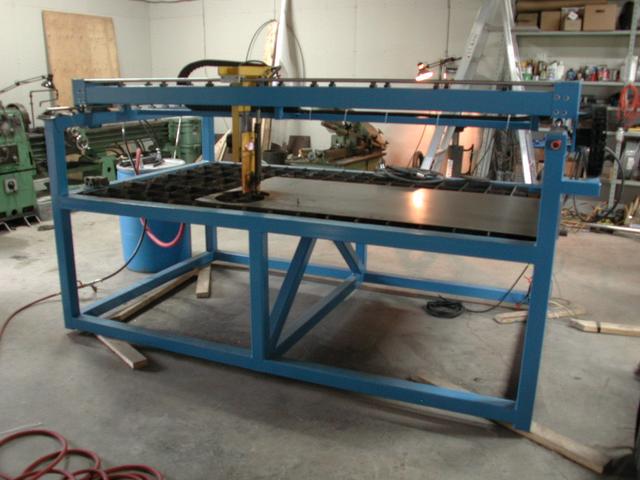
I ran it on a Via single board computer, a tiny board that sipped power and was still more than beefy enough to do real time control of 3 axis stepper motors and maintain a connection to the outside world. I cheated a bit by disabling interrupts during time critical sections and re-enabling the devices afterwards took some figuring out but overall the system was extremely reliable. I used it to cut up to 1/4" steel sheet for the windmill (it would cut up to 1" but then the kerf would be quite ugly), as well as much thinner sheet for the laminations. The latter was quite problematic because it tended to warp up towards the cutter nozzle while cutting and that would short out the arc. In the end we measured the voltage across the arc and then automatically had the nozzle back off in case of warping, which worked quite well, the resulting inaccuracies were very minor.
A single 1920x1080 framebuffer (which is a low resolution monitor in 2025 IMO) is 2MB. Add any compositing into the mix for multi window displays and it literally doesn’t fit in memory.
I had a 386 PC with 4MB of RAM when I was a kid, and it ran Windows 3.1 with a GUI, but that also had a VGA display at 640x480, and only 16-bit color (4 bits per pixel). So 153,600 bytes for the frame buffer.
I recently installed NT4 (including Plus!) in an emulator with a VESA video driver, and was greatly surprised when about half of the icons that I thought of as “Windows 2000” (including the memorable “My Computer” one with the bulbous sky-blue screen) turned out to be available even there, provided a non-indexed mode. The rest were the more familliar 16-color-compatible 95/NT4 ones, making for an incongruous result overall. I guess what I want to say is that 16-color compatibility is a large part of the 95/NT4 look from which 2000 very carefully departed.
The Amiga 500 had high res graphics (or high color graphics … but not on the same scanline), multitasking, 15 bit sound (with a lot of work - the hardware had 4 channels of 8 bit DACs but a 6-bit volume, so …)
In 1985, and with 512K of RAM. It was very usable for work.
For OCS/ECS hardware 2bit HiRes - 640x256 or 640x200 depending on region - was default resolution for OS, and you could add interlacing or up color depth to 3 and 4 bit at cost of response lag; starting with OS2.0 the resolution setting was basically limited by chip memory and what your output device could actually display. I got my 1200 to display crisp 1440x550 on my LCD by just sliding screen parameters to max on default display driver.
Games used either 320h or 640h resolutions, 4 bit or fake 5 bit known as HalfBrite, because it was basically 4 bit with the other 16 colors being same but half brightness. The fabled 12-bit HAM mode was also used, even in some games, even for interactive content, but it wasn't too often.
More like 6.2+ MB, or at least I'd sure hope that a FHD resolution is paired with at least a 24 bit (8 bpc) SDR color. And then there's the triple buffered vsync at play, so it's really more like 18.6+ MB.
If you use a tile-based hardware renderer, such as on the original nintendo chip, then pixels are rendered on the fly to the screen by the hardware automatically pulling pixels based on the tile map.
Doesn't the UEFI firmware map a GPU framebuffer into the main address space "for free" so you can easily poke raw pixels over the bus? Then again the UEFI FB is only single-buffered, so if you rely on that in lieu of full-fat GPU drivers then you'd probably want to layer some CPU framebuffers on top anyway.
Someone last winter was asking for help with large docker images and it came about that it was for AI pipelines. The vast majority of the image was Nvidia binaries. That was wild. Horrifying, really. WTF is going on over there?
You’re assuming a discrete GPU with separate VRAM, and only supporting hardware accelerated rendering. If you have that you almost certainly have more than 2MB of ram
The IBM PGC (1984) was a discrete GPU with 320kB of RAM and slightly over 64kB of ROM.
The EGA (1984) and VGA (1987) could conceivably be considered a GPU although not turning complete. EGA had 64, 128, 192, or 256K and VGA 256K.
The 8514/A (1987) was Turing complete although it had 512kB. The Image Adapter/A (1989) was far more powerful, pretty much the first modern GPU as we know them and came with 1MB expandable to 3MB.
Neither EGA or VGA were "GPUs", they were dumb framebuffers. Later VGA chipsets had rudimentary acceleration, basically just blitters - but that was a help.
The PGC was kind of a GPU if you squint a bit. It didn't work the way a modern GPU does where you've got masses of individual compute cores working on the same problem, but it did have a processor roughly as fast as the host processor that you could offload simple drawing tasks to. It couldn't do 3D stuff like what we'd call a GPU today does, but it could do things like solid fills and lines.
In today's money the PGC cost about the same as an RTX PRO 6000, so no-one really had them.
Anyone else remember the QNX demo disk from the late '90s? A full unix-like GUI environment that booted from a 1.44MB floppy disk. Ran super responsively in 386 machines with 8MB of RAM.
They had a free distro for a while, it's was pretty exciting being real time and with a microkernel and such. As a CS student it was neat to see where the world of computing might have went if different decisions had been made in the past.
That's only RISC OS 2 though. RISC OS 3 was 2MB, and even 3.7 didn't have everything in ROM as Acorn had introduced the !Boot directory for softloading a large amount of 'stuff' at boot time.
It was GUI defined manually by pixel coordinates, having more flexible guis that could autoscale and other snazy things made things really "slow" back then..
Sure we could go back... Maybe we should. But there are lots of stuff we take for granted to day that were not available back then.
RISC OS has the concept of "OS units" which don't map directly onto pixels 1:1, and it was possible to fiddle with the ratio on the RiscPC from 1994 onwards, giving reasonably-scaled windows and icons in high-resolution modes such as 1080p.
When I first started using QNX back in 1987/88 it was distributed on a couple of 1.4MB floppy diskettes! And you could install a graphical desktop that was a 40KB distribution!
This is cool. My first into to a practical application of Linux in the early 2000s was using Damn Small Linux to recover files off of cooked Windows Machines. I looked up the project the other day while reminiscing and thought it would be interesting if someone took a real shot at reviving the spirit of the project.
I used to have a floppy and a mini-cd boot version of these. The mini-cd looks like a credit card and fit into a standard size cd drive. Reading the history of the project is a bit of a bummer, but still love the project ethos.
Damn Small Linux was the second Linux I tried (after the free CD promotion that Ubuntu did). I liked it and it was fun to play with, but I was such a newbie that I wasn't able to really use it for anything.
It's 20 years later and I've been running Linux for most of that time, so I probably would have even more fun revisiting DSL and Tiny Core Linux.
I love lightweight distros. QNX had a "free as in beer" distro that fit on a floppy, with Xwindows and modem drivers. After years of wrangling with Slackware CDs, it was pretty wild to boot into a fully functional system from a floppy.
Licensing, and QNX missed a consumer launch window by around 17 years.
Some businesses stick with markets they know, as non-retail customer revenue is less volatile. If you enter the consumer markets, there are always 30k irrational competitors (likely with 1000X the capital) that will go bankrupt trying to undercut the market.
It is a decision all CEO must make eventually. Best of luck =3
"The Rules for Rulers: How All Leaders Stay in Power"
This also underscores my explanation for the “worse is better” phenomenon: worse is free.
Stuff that is better designed and implemented usually costs money and comes with more restrictive licenses. It’s written by serious professionals later in their careers working full time on the project, and these are people who need to earn a living. Their employers also have to win them in a competitive market for talent. So the result is not and cannot be free (as in beer).
But free stuff spreads faster. It’s low friction. People adopt it because of license concerns, cost, avoiding lock in, etc., and so it wins long term.
Yes I’m kinda dissing the whole free Unix thing here. Unix is actually a minimal lowest common denominator OS with a lot of serious warts that we barely even see anymore because it’s so ubiquitous. We’ve stopped even imagining anything else. There were whole directions in systems research that were abandoned, though aspects live on usually in languages and runtimes like Java, Go, WASM, and the CLR.
Also note that the inverse is not true. I’m not saying that paid is always better. What I’m saying is they worse is free, better was usually paid, but some crap was also paid. But very little better stuff was free.
There is also the option by well written professional wherer the startergy is to grab as much market share as they can by allowing the proliferation of their product to lockup market/mindshare and rleaget the $ enforcement for later - successfully used by MSWindows for the longest time and Photoshop .
Conversly i remenber Maya or Autodesk used to have a bounty program for whoever would turn in people using unlicensed/cracked versions of their product.Meanwhile Blender (from a commercial past) kept their free nature and have connsistently grown in popularity and quality without any such overtures.
Of course nowadays with Saas everything get segmented into wierd verticals and revenue upsells are across the board with the first hit usually also being free.
As a business, dealing with Microsoft and Oracle is not a clean transactional sale.
They turned into legal-service-firms along the way, and stopped real software development/risk at some point in 2004.
These firms have been selling the same product for decades. Yet once they get their hooks into a business, few survive the incurred variable costs of the 3000lb mosquito. =3
And incredibly responsive compared to the operatings systems of even today. Imagine that: 30 years of progress to end up behind where we were. Human input should always run at the highest priority in the system, not the lowest.
When I was a teenager, tiny core saved me for a few months. My laptop had died and all I could use until I got a replacement was an old desktop computer we had around with 256MB of RAM. It was around the end of the windows 7 era, so even Xubuntu was struggling on such an old computer.
Tiny Core ran surprisingly well and I could actually use it to browse the web and use IRC.
I have an older laptop with a 32-bit processor and found that TinyCoreLinux runs well on it. It has its own package manager that was easy to learn. This distro can be handy in these niche situations.
Similar situation here. Have some old 32bit machines that I'm turning into writer decks. Most Linux distros have left 32bit behind so you can't just use Debian or Ubuntu and a lot of distros that aim to run on lower hardware are Ubuntu derivatives
Personally, I think that dropping 32 bit support for Linux is a mistake. There is a vast number of people in developing countries on 32 bit platforms as well as many low cost embedded platforms and this move feels more than a little insensitive.
In around 2002, I got my hands on an old 386 which I was planning to use for teaching myself things. I was able to breathe life into it using MicroLinux. Two superformatted 1.44" floppy disks and the thing booted. Basic kernel, 16 colour X display, C compiler and Editor.
I don't know if there are any other options for older machines other than stripped down Linux distros.
Is that actually tiny core? It’s _likely_ it is, but that’s not good enough.
> this same thing came up a few years ago
Honestly, that makes this inexcusable. There are numerous SSL providers available for free, and if that’s antithetical to them, they can use a self signed certificate and provide an alternative method of verification (e.g. via mailing list). The fact they don’t take this seriously means there is 0 chance I would install it!
I don’t think so, but it’s always struck me as a good idea - it’s actual decentralised verification of a value that can be confirmed by multiple people independently without trusting anyone other than the signing key is secure.
> I am used to code signing with HSMs
Me too, but that requires distributing the public key securely which… is exactly where we started this!
An integrity check where both what you're checking and the hash you're checking against is literally not better than nothing if you're trying to prevent downloading compromised software. It'd flag corrupted downloads at least, so that's cool, but for security purposes the hash for a artifact has to be served OOB.
It is better than nothing if you note it down. You can compare it later if somebody / or you was compromised to see whether you had the same download as everyone else.
Sorry but this is nonsense. It’s better than nothing if you proactively log the hashes before you need them, but it’s actively harmful for anyone wi downloads it after it’s compromised.
"It is better than nothing" is literally what I said. But thinking about it more, I actually think is quite useful. Any kind of signature or out-of-band hash is also only good if the source is not compromised, but knowing after the fact whether you are affected or not is extremely valuable.
I will add that most places, forums, sites don’t deliver the hash OOB. Unless you mean like GPG but that would have came from same site. For example if you download a Packer plugin from GitHub, files and hash all comes from same site.
> I will add that most places, forums, sites don’t deliver the hash OOB. Unless you mean like GPG but that would have came from same site. For example if you download a Packer plugin from GitHub, files and hash all comes from same site.
This thread started by talking about the site serving the download (and hash) over http. Github serves their content over https, so you're not going to be MITM'ed. There are other attack vectors, but if the delivery of the content you're downloading is compromised/MITM'ed, you've lost.
If you want real integrity + provenance, you need a GPG-signed ISO and a public key obtained independently (or at least via HTTPS). Hashes alone aren’t a security measure; HTTPS + signatures are the modern minimum.
Tiny Core has always amazed me. The amount of functionality they fit into such a small footprint shows how far you can go when you optimize for simplicity.
Could such a distro support my i486-DX4-100 system with 64MB of RAM? I've been looking for something other than Win95, NT4, and OpenBSD 6.8 to run on this box. :)
I used to run Puppy Linux and then TCL (and its predecessor DSL) on a super old Pentium 3 laptop with like 700mb of RAM or something. Made it actually usable!
Thank you for that comment, I did not realize Pi Zero and Pi Zero 2W worked with TCL. I am brewing an application for that environment right now so this may just save the day and make my life a lot easier. Have you tried video support for the Pi specific cams under TCL?
As I updated my thinkpad to 32 GB of RAM this morning (£150) I remembered my £2k (corporate) thinkpad in 1999, running Windows 98, had 32 MB of RAM. And it ran full Office and Lotus notes just fine :)
But can they please empower a user interface designer to simply improve the margins and paddings of their interface? With a bunch of small improvements it would look significantly better. Just fix the spacing between buttons and borders and other UI elements.
I sympathize, but I feel compelled to point out that the parent didn’t say that the interface had to look like a contemporary desktop.
In my opinion, I believe the Tiny Core Linux GUI could use some more refinement. It seems inspired by 90s interfaces, but when compared to the interfaces of the classic Mac OS, Windows 95, OS/2 Warp, and BeOS, there’s more work to be done regarding the fit-and-finish of the UI, judging by the screenshots.
To be fair, I assume this is a hobbyist open source project where the contributors spend time as they see fit. I don’t want to be too harsh. Fit-and-finish is challenging; not even Steve Jobs-era Apple with all of its resources got Aqua right the first time when it unveiled the Mac OS X Public Beta in 2000. Massive changes were made between the beta and Mac OS X 10.0, and Aqua kept getting refined with each successive version, with the most refined version, in my opinion, being Mac OS X 10.4 Tiger, nearly five years after the public beta.
If you look at the screenshots it immediately jumps out that it is unpolished: the spacings are all over the place, the window maximize/minimize/close buttons have different widths and weird margins.
I thought that would be immediately clear to the HN crowd but I might have overestimated your aesthetic senses.
Look at screenshots -> wallpaper window. The spacing between elements is all over the place and it simply looks like shit. Seeing this I'm having doubts if the team who did this is competent at all
I know that not everybody spent 10 years fiddling with CSS so I can understand why a project might have a skill gap with regards to aesthetics. I'm not trying to judge their overall competence, just wanted to say that there are so many quick wins in the design it hurts me a bit to see it. And due to nature of open source projects I was talking about "empowering" a designer to improve it because oftentimes you submit a PR for aesthetic improvements and then notice that the project leaders don't care about these things, which is sad.
Too much information density is also disorienting, if not stressing. The biggest problem is finding that balance between multiple kinds of users and even individuals.
It's not about the damn borders it is about the spacing between the buttons and other UI elements as you can see in the screenshot. I don't want them to introduce some shitty modern design, just fix the spacing so it doesn't immediately jump out as odd and unpolished.
Pretty sure it was not about presence of visible borders, but about missing spacing between borders and buttons. That on some screenshots, but not others. It's not like this ui has some high-density philosophy, it's just very inconsistent
This just looks like a standard _old_ *nix project. I've used Tiny, a couple of decades ago IIRC, from a magazine cover CD.
I imagine the sign-off date of 2008, the lack of very simple to apply mobile css, and no https to secure the downloads (if it had it then it would probably be SSL).
This speaks to me of a project that's 'good enough', or abandoned, for/by those who made it. Left out to pasture as 'community dev submissions accepted'.
I've not bothered to look, but wouldn't surprise me if the UI is hardcoded in assembly and a complete ballache to try and change.
/* On the website, body { font-size: 70%; } — why? To drive home the idea that it's tiny? The default font size is normally set to the value comfortable for the user, would be great to respect it. */
Is there a reason the site doesn't support HTTPS? For a distro offering ISO downloads, this seems like a meaningful security gap -> it makes MITM attacks trivial for anyone on the network path.
Tiny Core also runs from ramdisk, uses a packaging systems based on tarballs mounted in a fusefs and can be installed on a dos formatted usb key. It also has a subdistro named dCore[1] which uses debian packages (which it unpacks and mounts in the fusefs) so you get access to the ~70K packages of debian.
Both are deprecated though. And both say something unexpected on their repositories: one suggests you to use Docker Desktop (what?!), the other to try Fedora (what?!!). Am I taking crazy pills?


Phenomenal for those low powered servers you just want to leave on and running some tiny batch of cronjobs [1] or something for months or years at a time without worrying too much about wear on the SD card itself rendering the whole installation moot.
This is actually how I have powered the backend data collection and processing for [2], as I wrote about in [3]. The end result is a static site built in Hugo but I was careful to pick parts I could safely leave to wheedle on their own for a long time.
[1]: https://til.andrew-quinn.me/posts/consider-the-cronslave/
[2]: https://hiandrewquinn.github.io/selkouutiset-archive/
[3]: https://til.andrew-quinn.me/posts/lessons-learned-from-2-yea...
reply